SPI Protocol: Introduction

SPI stands for Serial Peripheral Interface and it is a synchronous serial communication interface used for short-distance communication. SPI interface was developed by Motorola in the 1980s to be primarily used in embedded systems and since then it has become a de facto standard. SPI interface is widely used in SD cards, RFID card reader modules, and 2.4GHz wireless transmitters and receivers to communicate with microcontrollers.

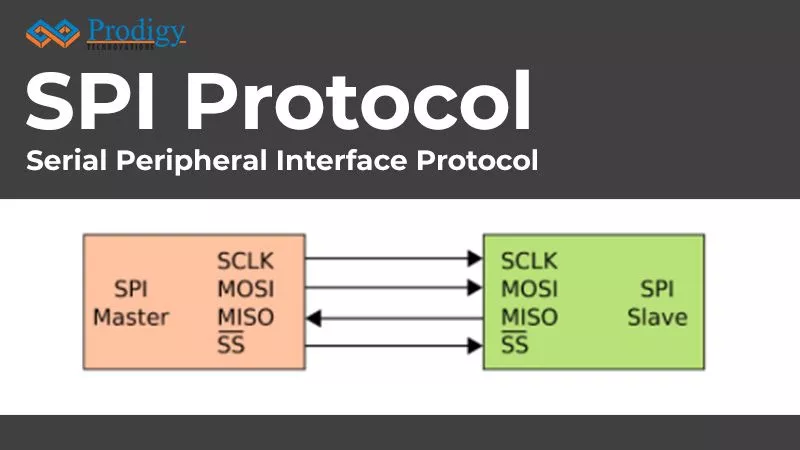
SPI is a full duplex protocol that uses a master-slave architecture with a single master. The master is the controlling device which is usually a microcontroller, while the slave is usually a sensor, display, or memory chip that takes instructions from the master. The simplest configuration of SPI is a single master-single slave system, but one master can control more than one slave. One unique benefit of SPI is that the data can be transferred without any interruption and any number of bits can be sent or received in a continuous stream.
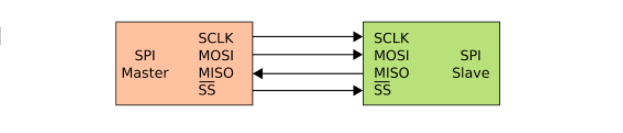
Figure 1. Single Master to Single Slave SPI Interface

THE SPI INTERFACE

SPI requires four signals namely;

  • Serial Clock (SCLK) – SCLK is a line for the clock signal.
  • Master In Slave Out (MISO) – Line for slaves to send data to the master.
  • Master Out Slave In (MOSI) – Line for master to send data to the slave.
  • Slave Select (SS) – Line for the master to select which slave to send the data to.

Three signals are shared by all devices on the SPI bus: SCLK, MOSI, and MISO. SCLK is generated by the master and it is used for synchronization. MOSI and MISO are the data lines used for data transfer between master and slave. The direction of transfer can be both ways simultaneously, but an SPI device interested in only transmitting data can choose to ignore the receiving bytes and a device only interested in the incoming bytes can transmit dummy bytes. Each device has its own SS line. The master pulls low on a slave’s SS line to select that particular slave for communication.
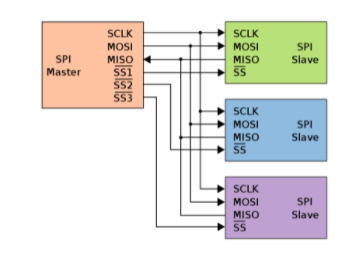
Figure 2. Typical SPI bus: One master and Three slaves

SPI Protocol: Theory of operations

THE CLOCK

The clock signal synchronizes the output of data bits from the master to the sampling of bits by the slave. One bit of data is transferred in each clock cycle, so the speed of data transfer is determined by the frequency of the clock signal. SPI communication is always initiated by the master since the master configures and generates the clock. The clock signal in SPI can be modified using the clock polarity and clock phase. These two configurations work together to define when the bits are at the output when sampled. Clock polarity can be set by the master to allow for bits to be at the output and sampled either on the rising or falling edge of the clock cycle. The clock phase can be set for output and sampling to occur either on the first edge or the second edge of the clock cycle.
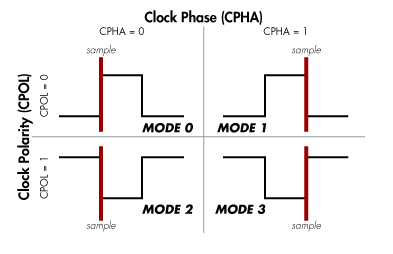
Figure 3. SPI Modes

SLAVE SELECT (SS)

The master can choose which slave he wants to talk to by setting the slave’s SS/CS line to a low voltage level. In the idle, non-transmitting state, the slave select line is kept at a high voltage level. Multiple SS/CS pins may be available on the master which allows for multiple slaves to be wired in parallel. If only one SS/CS pin is present, multiple slaves can be wired to the master by daisy chain configuration. The SPI bus can operate with a single master device and with one or more slave devices. If a single slave device is used then the SS pin may be fixed to logic low.

MOSI AND MISO

The master sends data to the slave bit by bit in serial using the MOSI line. The slave receives the data sent from the master at the MOSI pin. Data sent from the master to the slave is usually sent with the MSB first. The slave can also send data back to the master through the MISO line in serial. The data sent from the slave back to the master is usually sent with the LSB first.

DATA TRANSMISSION

To initialize the data transmission the master first outputs the clock signal. The master then switches the SS/CS pin to a low voltage level which activates a particular slave after which the master sends the data one bit at a time to the slave along the MOSI line. The slave reads the bits as they are received. If a response is needed, the slave returns the data one bit at a time to the master along the MISO line. The master reads the bits as they are received.

TRANSMISSION SPEED OF SPI PROTOCOL

The maximum SPI clock speed is dependent on the number of devices on the bus. There is no true maximum clock speed of SPI and it is solely dependent on the clock. SPI bus can run at high speeds transferring data at up to 60Mbps over short distances. SPI clock frequencies can reach up to 25MHz theoretically, but in practice, the maximum clock is limited to the frequency explicitly specified in the electrical specifications in the datasheet.

DEBUG OF SPI PROTOCOL

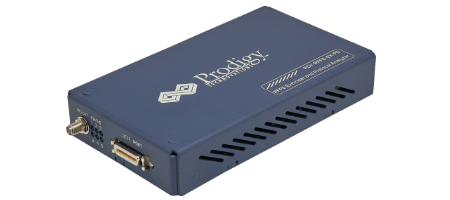
Debug of SPI Protocol can be easily done using a Protocol Analyzer. Prodigy Technovations has developed SPI Protocol Analyzer that can debug the SPI Protocol.
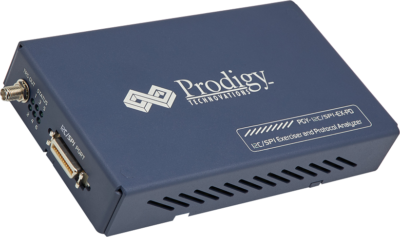
Prodigy’s SPI I2C Protocol Analyzer

About Prodigy:

Prodigy Technovations is the leading provider of protocol analysis solutions. Prodigy has developed state of the art Protocol analyzer to debug various Protocols. The protocol analyzers range from CAN, I2C, SPI, QSPI, I3C, PCIe, and UFS Plus many other protocols on the serial bus. Check out our products!
Introduction 

HDMI is a digital replacement for existing analog video standards. It is termed as the catalyst for the DTV revolution. The DTV revolution is driving the HDMI standard to support an increase in data speed to higher video resolutions to meet emerging needs. As a result, design and validation engineers need tools to improve efficiency by performing a wide range of standards-required tests quickly and reliably.

HDMI protocol overview 

Fig 1 Source, Cable, and Sink devices

HDMI: High Definition Multimedia Interface, a compact uncompressed digital video and audio interface. HDMI system architecture is defined to consist of sources and sinks. A given device may have one or more HDMI inputs and one or more HDMI outputs. Each HDMI input on these devices has to follow all of the rules for an HDMI sink and each HDMI output shall follow all of the rules for an HDMI source.

HDMI cables and connectors carry four differential pairs that make up the TMDS data and clock channels. These channels are used to carry video, audio, and auxiliary data. In addition, HDMI carries a VESA DDC channel. The DDC is used for configuration and status exchange between a single source and a single sink. The optional CEC protocol provides high-level control functions between all of the various audiovisual products in a user’s environment.

Protocol Overview: 

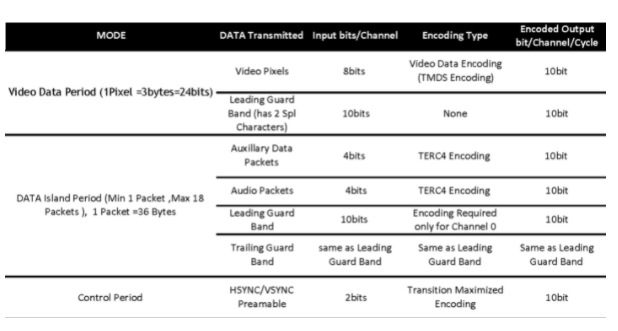
The HDMI link operates in one of three modes: Video Data Period, Data Island period, and Control period. During the Video Data Period, the active pixels of an active video line are transmitted. During the data island period, audio and auxiliary data are transmitted using a series of packets. The control period is used when no video, audio, or auxiliary data needs to be transmitted.

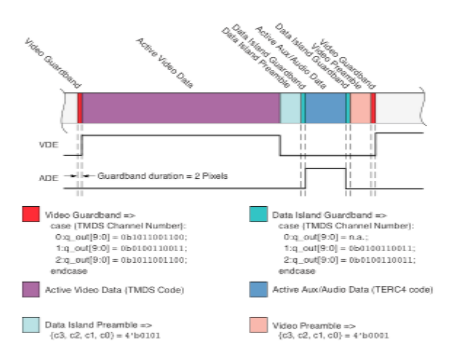
Fig 2 Video and Audio data pictorial representation 

Table 1 HDMI Data Modes

Video Data Period:  Video data periods are used to carry the pixels of an active video line. Each video data period is preceded by a preamble.  Following the preamble, the video data period begins with a two-character video leading guard band. There is no trailing guard band for the video data period. In active video periods, 24 bits of pixel data are encoded using TMDS transition minimized encoding during each TMDS clock period.

Fig 3 Video and Audio Data representation 

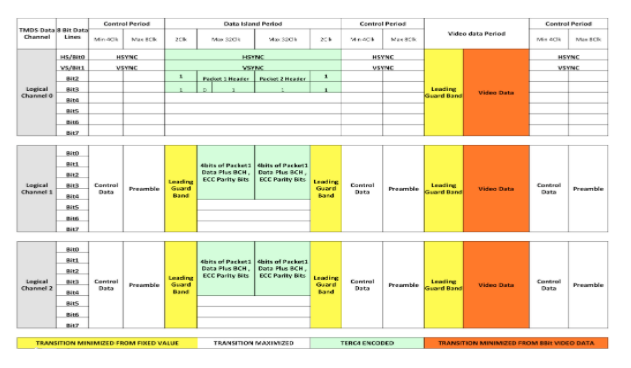
Data Island Period: During the data island period, audio and auxiliary data are transmitted using a series of packets. This auxiliary data includes info frames and other data describing the active audio or video stream or describing the source. Each data island is preceded by a preamble. Following the preamble, each Island starts with a leading guard band. The first packet of the data island then follows. During every TMDS clock period of the data island, including the guard band, bits 0 and 1 of TMDS channel 0 transmit an encoded form of HSYNC and VSYNC. Bit 2 of TMDS channel 0 is used to transmit the packet header. All four bits of TMDS channels 1 and 2 are used for the packet data. Each packet is 32 pixels long and is protected by BCH ECC for error detection and correction.

During the data island, each of the three TMDS channels transmits a series of 10-bit characters encoded from a 4-bit input word, using TMDS Error Reduction Coding (TERC4). TERC4 significantly reduces the error rate on the link by choosing only 10-bit codes with high inherent error avoidance.

Fig 4 Video/Audio data on TMDS Data Channel 

Control Period: The Control period is used when no video, audio, or auxiliary data needs to be transmitted. A control period is required between any two periods that are not control periods.

The control period is used for the transmission of the preamble. The sink for character synchronization also uses the control period.

During control periods, 2 bits per channel, or 6 bits total are encoded per TMDS clock using a transition-maximized encoding. These 6 bits are HSYNC, VSYNC, CTL0, CTL1, CTL2, and CTL3. Near the end of every control period, a preamble, using the CTLx bits, indicates whether the next data period is a video data period or a data island period.

Preamble: Immediately preceding each video data period or data island period is the preamble. This is a sequence of eight identical control characters that indicate whether the upcoming data period is a video data period or a data island. The values of CTL0, CTL1, CTL2, and CTL3 indicate the type of data period that follows. The remaining control signals, HSYNC and VSYNC, may vary during this sequence.

CTL0

CTL1 CTL2 CTL3 Data Period Type
1 0 0 0 Video Data Period
1 0 1 0 Data Island Period

Table 2 Data Period Type

Challenges in Validating HDMI Protocol

An HDMI technology provider needs to comply with the HDMI specification provided by the HDMI/MHL consortium.  The HDMI/MHL protocol analysis software embeds the HDMI1.4a and MHL 2.0 Compliance Test procedure, ensuring dependable results. There are several tests to be carried out at the protocol layer. This test requires complex measurement techniques using dedicated HDMI/MHL protocol analyzers.  These instruments offer engineers visibility into the logic state of the signal without correlation to the clock and data.  Many times, protocol irregularities are hidden in the electrical signals in the PHY layer and logical layer.

Some of the drawbacks and challenges faced by the engineers during validation are listed below:

  • Lack of a single tool or instrument to handle physical and Protocol layer challenges
  • Difficulty in correlating the data from Protocol with the Physical layer
  • Increasing complexity of the test system due to multiple pieces of equipment.
  • There are no instruments that provide overhead information along with payload (actual image)
  • No seamless synchronization possible from mapping the failure of a protocol test to actual

HDMI Protocol Analysis Software

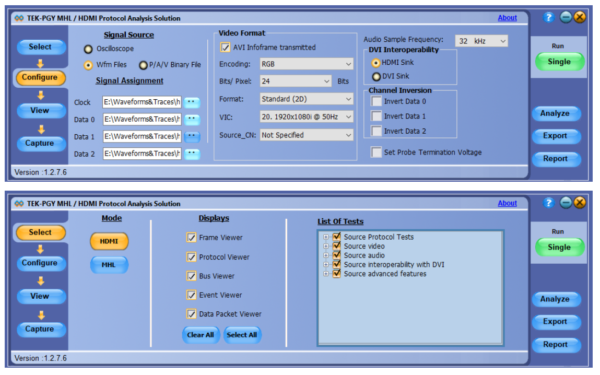
The industry’s first oscilloscope-based TEK-PGY-HDMI/MHL Protocol Analysis software analyzes every event in the HDMI stream from HDMI/MHL frame including the phy layer which conventional protocol analyzers cannot accomplish.

Prodigy’s HDMI Protocol Analysis Software

About Prodigy Technovations Pvt Ltd

Prodigy Technovations Pvt Ltd (dev-prodigy.greatsolutionsatwork.com/) is a leading global technology provider of Protocol Decode, and Physical layer testing solutions on test and measurement equipment. The company’s ongoing efforts include the successful implementation of innovative and comprehensive protocol decode and physical layer testing solutions that span the serial data, telecommunications, automotive, and defense electronics sectors worldwide.

UART Protocol: INTRODUCTION

UART stands for Universal Asynchronous Receiver Transmitter. A UART’s main purpose is to transmit and receive serial data. UART was developed by Gordon Bell at Digital Equipment Corporation in the 1960s. UARTs are used in automobiles, smart cards, and SIMs in which they are commonly integrated in microcontroller chips.

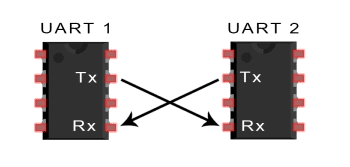
In UART communication, the Transmitting UART converts parallel data to serial form and transmits it serially to the receiving UART, which then converts the serial data back into parallel data. Only two wires are needed to transmit data between the two UARTs. UART data bits are sent one by one, from the LSB to the MSB, framed by start and stop bits to precisely handle timing in the communication channel.

UART transmits bits asynchronously, which means that there is no clock signal to synchronize the output of bits from the transmitting UART to the sampling of bits by the receiving UART. Instead of a clock signal, the transmitting UART adds a start and stop bit to the data packet being transferred. Baud rate is a measure of the speed of data transfer, expressed in bits per second. Both UARTs must operate at the same baud rate. The standard baud rate is 9600bps which is sufficient for low-speed operations and it can reach speeds of up to 115200bps.

Transmitting and Receiving UART

Figure 1. Transmitting and Receiving UART

UART Protocol: THEORY OF OPERATION 

The Transmitter UART is the one that receives the data on a data bus from a CPU or microcontroller. After the transmitting UART gets the parallel data from the data bus, it adds a start bit, a parity bit, and a stop bit which makes a data packet. Next, the data packet is sent to the output serially, bit by bit. The receiving UART reads the data packet bit by bit and then converts the data back into parallel form removing the start bit, parity bit, and stop bits. After which, the receiving UART transfers the data packet in parallel to the data bus at the receiving end.

UART data packet 

Figure 2. UART data packet

START BIT 

To start the transfer of data, the transmitting UART pulls the transmission line from high to low for one clock cycle. When the receiving UART detects the high-to-low voltage transition, it begins reading the bits in the data frame at the frequency of the baud rate.

DATA FRAME

The data frame contains the actual data being transferred. It can be 5 bits if a parity bit is not used or up to 8 bits long if a parity bit is used. If no parity bit is used, the data frame can be 9 bits long. In most cases, the data is sent with the least significant bit (LSB) first.

PARITY

Parity is used for error checking in UART and it describes the evenness or oddness of a number. The parity bit is a way for the receiving UART to tell if any data has changed during transmission or not. Bits can be changed by mismatched baud rates or long-distance data transfers.

After the receiving UART reads the data frame, it counts the number of bits with a value of 1 and checks if the total is an even or odd number. If the parity bit is a 0 (even parity), the 1 bits in the data frame should total to an even number. If the parity bit is a 1 (odd parity), the 1 bits in the data frame should total to an odd number. When the parity bit matches the data, the UART knows that the transmission was free of errors. But if the parity bit is a 0, and the total is odd; or the parity bit is a 1, and the total is even, the UART knows that bits in the data frame have changed.

Odd and even parity UART

Figure 3. Odd and even parity UART

STOP BIT 

To signal the end of the data packet, the sending UART drives the data transmission line from a low voltage to a high voltage for at least two-bit durations.

UART Protocol Analysis and Debug :

UART is a simple protocol however the analysis continues to remain a challenge. Prodigy Technovations has multiple solutions for the UART protocol analysis and Debug.

1. UART Protocol Analyzer and Exerciser.

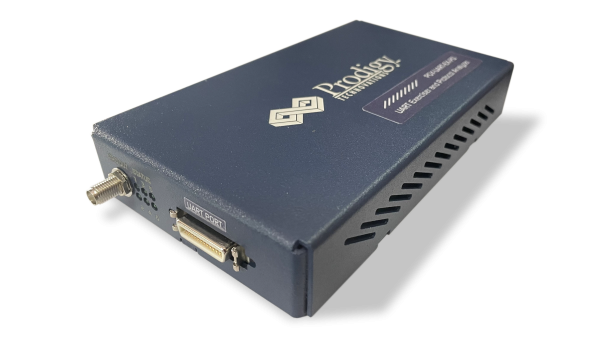
UART Protocol Analyzer and Exerciser

2. UART Protocol Analysis software.

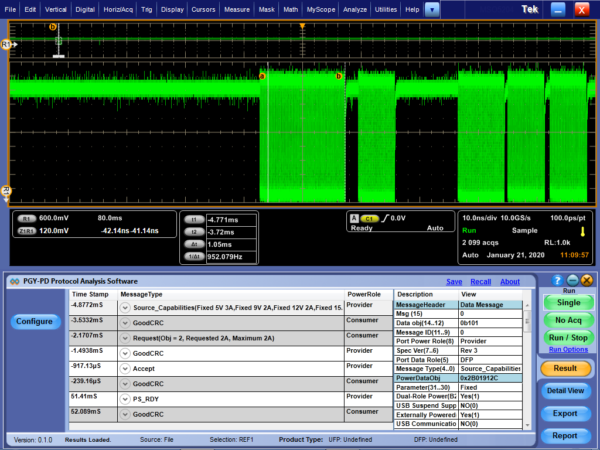
 UART Protocol Analysis software.

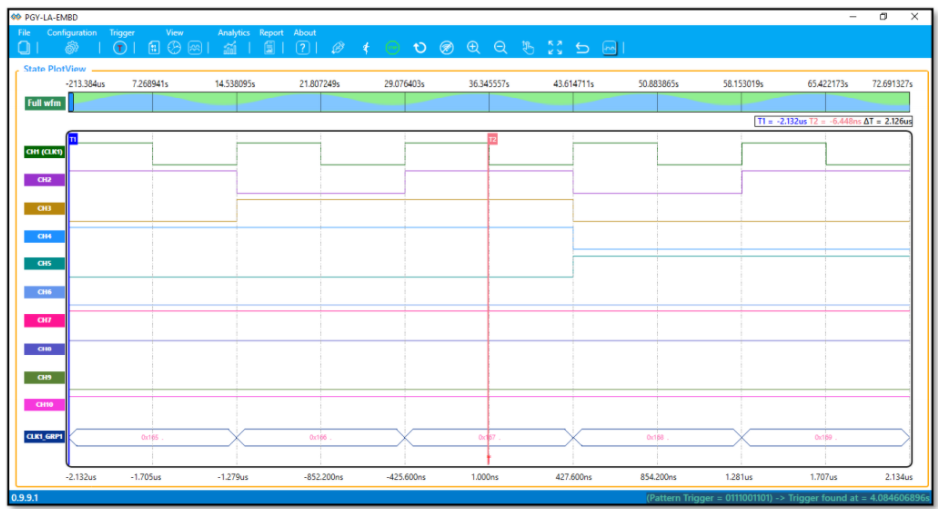
3. Logic Analyzer with inbuilt UART protocol decode capability

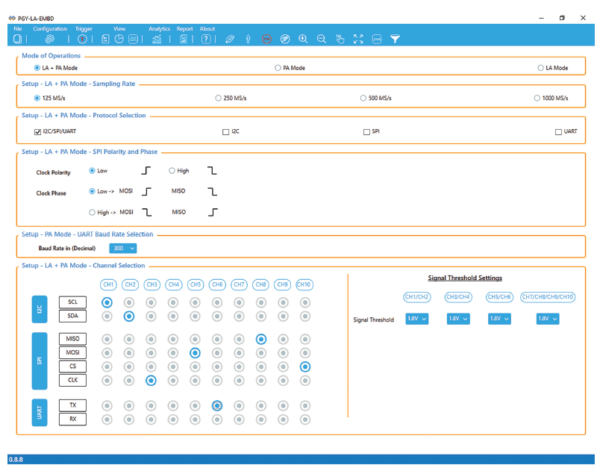
Logic Analyzer with inbuilt UART protocol decode capability

QSPI Protocol: Introduction

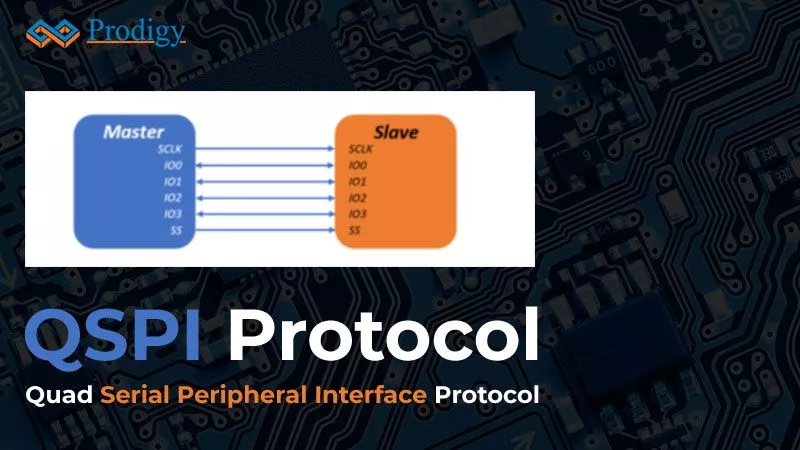
Quad Serial Peripheral Interface (QSPI) is a serial communication interface. QSPI has been specifically designed for talking to flash chips. QSPI is useful in applications that involve a lot of memory-intensive data like multi-media and on-chip memory is not enough. It can also be used to store code externally and it can make the external memory behave as fast as the internal memory through some special mechanisms.

QSPI  Protocol: Theory of operations

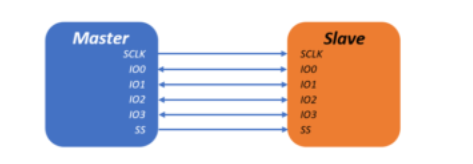
QSPI uses 4 data lines namely; I0, I1, I2, and I3. QSPI uses a data queue with pointers that allow data transfers without any CPU. In addition, it has a wrap-around mode which allows continuous transfer of data from to/ from the queue. The QSPI peripheral acts as the memory-mapped parallel device for the CPU. QSPI is typically used in applications such as ADC converters etc. QSPI can reach throughput rates up to 40Mbps.

Quad SPI setup with a single slave

Figure 1. Quad SPI setup with a single slave

QSPI Protocol working

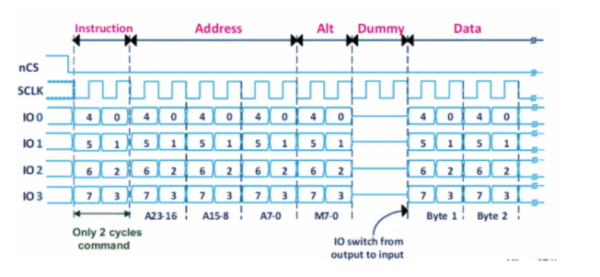
The Quad SPI interface configures the data lines on the fly so that they can act as outputs if required. This is helpful if we need to send some information to the flash memory and they can act as inputs if we need to read some memory contents.

It uses four data lines namely I0, I1, I2 and I3 as shown:

QSPI Working

Figure 2. QSPI Working

The above figure shows the stages of a Quad SPI exchange:

In the first stage, the instruction is sent over the IO lines followed by the address and the Alt field which can be implemented the way the flash memory wants it to be

In the second stage, for a short period of two clock cycles, the transmission is paused to allow for changing the direction of the I/O line as shown above.

In the third stage, the data line is sent from the flash device to the microcontroller. Here, 4 bits are transferred in every clock cycle. The bit order is IO0 sends bit 0, IO1 sends bit 1 and so on in the first clock cycle, and bits 4,5,6 and 7 are sent out in the second clock cycle. Thereby transmitting the entire byte in just two clock cycles.

Challenges in Debugging QSPI:

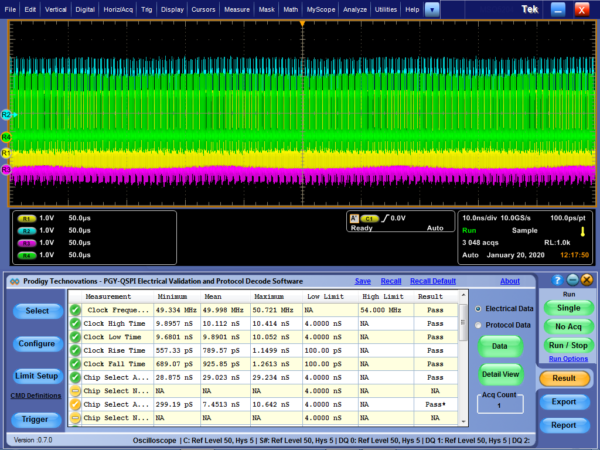
Debugging QSPI remains a challenge for most developers as there are a limited number of devices out in the market using QSPI. Prodigy Technovations provides QSPI Protocol Analyzer and Exerciser, and QSPI debug software.

QSPI Electrical Validation and Protocol Decode Software

QSPI Electrical Validation and Protocol Decode Software

Conclusion :

Prodigy Technovations offers QSPI Protocol Analysis and Decode Software as well as much other protocol decode software such as I2C, SPI, eMMC, and ONFI. Prodigy Technovations has developed itself as a protocol analysis leader.

RFFE Protocol: Introduction

Mobile radio communication involves multi-radio systems composed of several parallel transceivers making a leap in complexity for the RF front-end design. RF front-end devices include power amplifiers, low-noise amplifiers, filters, switches, power management modules, antenna tuners, and sensors. The devices may be located either in a separate unit or they may be integrated into a single module depending on the applications. RF Front-End Control Interface (RFFE) offers a common method for controlling RF front-end devices. RFFE provides a low-complexity solution to meet the cost and performance of RF front-end devices. RFFE is designed to support existing 3GPP standards such as LTE, LTE-A, EGPRS, UMTS, HSPA, etc, and also other non-3GPP air interfaces.

RFFE Protocol: Theory of operation

RFFE Protocol is a two-wire serial interface intended to be used to connect one or more radio frequency ICs (RFICs) in a mobile terminal to their related front-end modules (FEMs) to control and monitor them. RFFE has two primary signal lines- A serial bidirectional data signal (SDATA) and a clock signal (SCLK). RFFE interface enables systems to efficiently control various FEMs in next-generation mobile terminals with the increased complexity of performance supporting multi-mode, multi-band, and multiple antennas, using RFFE bus or by using multiple buses.

There are two configurations of RFFE namely, Basic configuration and Complex configuration.

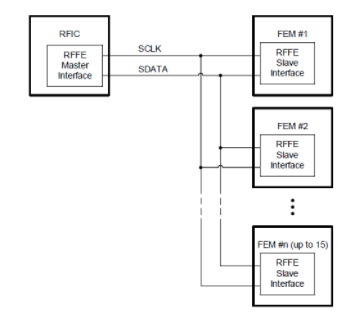
The basic configuration and its bus structure are shown in Figure 1 which is a single master configuration. RFFE requires two primary signaling lines- One serial bidirectional data signal (SDATA) and one clock signal (SCLK), which is controlled by the bus owner master. Additional signals may be present on an RFFE device as a means for providing additional proprietary functionality.

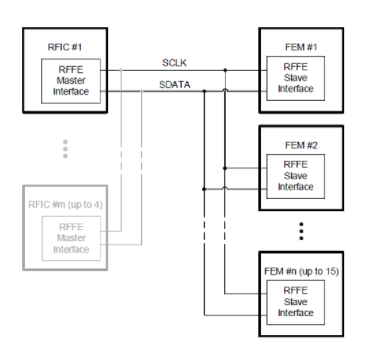
RFFE v2 is a more complex bus structure. This is a multi-master configuration and the high-level view of such a structure is shown in Figure 2. SCLK and SDATA signal lines and connections remain the same, but the number of master devices on a particular bus instance may be up to four.

RFFE v1 Interface and Bus Structure

Figure 1. RFFE v1 Interface and Bus Structure

RFFE v2 interface and bus structure

Figure 2. RFFE v2 interface and bus structure

RFFE Pin Descriptions:

VIO

VIO is the RFFE interface voltage reference or supply. The primary function of the VIO signal is to provide a shared voltage reference for the SCLK and SDATA pins for all devices on an RFFE bus instance.

SCLK

The SCLK signal provides the clocking and synchronization for all devices on an RFFE bus. It is always sourced by the Bus Owner Master (BOM) device.

In the case of a bus that has multiple master devices, the responsibility for the sourcing of SCLK is transferred to the new BOM any time that a master switchover occurs. There will be a dedicated SCLK signal for each RFFE bus instantiation.

SDATA

The SDATA signal on an RFFE bus provides the mechanism for command and data transfers, on the RFFE bus.

For write only slaves the SDATA pin is input-only. For slaves supporting read and write operations, the SDATA is bi-directional.

FREQUENCIES OF OPERATION: RFFE BUS SPEED RATES

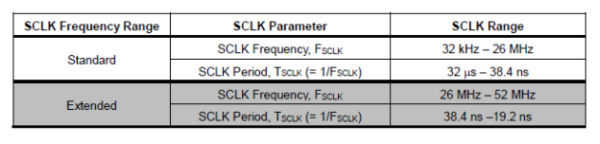
RFFE provides a continuous range of frequencies for operation thus providing flexibility in clock sourcing. The active RFFE master device BOM is responsible for sourcing the non-continuous bus clock (SCLK) by specified requirements such as edge transition times.

The master device may select a desired operating frequency for SCLK at any time. The available range of SCLK frequencies and their parameters are given in the table below:

RFFE Frequencies of operation

Figure 3. RFFE Frequencies of operation

RFFE Protocol: Data Transfer Structure

SEQUENCE START CONDITION (SSC)

The Sequence Start Condition (SSC) shall be a unique condition on the bus which is identified by a rising edge of SDATA, followed later by a falling edge on SDATA, all while SCLK remains at a logic ‘0’ level. The SSC is used by the master to identify the beginning of a new command sequence. Slaves shall synchronize themselves to expect a new command sequence following the detection of an SSC. The master shall generate the SSC by driving SDATA to logic level ‘1’ for one SCLK period, then to logic level ‘0’ for one SCLK period, all while holding SCLK at logic level ‘0’.

Sequence start condition

Figure 4. Sequence start condition

FRAMES

There are three types of frames and all three frame types consist of address plus command, or of data, or address bits, plus a parity bit.

COMMAND FRAME

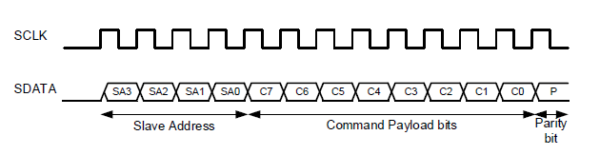
A command frame shall consist of a 4-bit slave address field, an 8-bit command payload field, and a single parity bit, for a total of 13 bits. The first four bits of the address field are the slave address (SA) bits, followed by the eight command bits, and finally followed by the parity bit for the frame. The parity bit is calculated over the 12 bits of the CF. The command frame structure is shown

Command Frame

Figure 5. Command Frame

DATA OR ADDRESS FRAME

A data frame or an address frame shall consist of right data bits or eight address bits respectively and a single parity bit. The frame is called an address frame when the payload bits carry address information and a data frame when the payload bits carry data information. Otherwise, the frame structure is identical. The type of payload data being carried is defined by the position of the frame within the command sequence.

Data or Address Frame

Figure 6. Data or Address Frame

NO RESPONSE FRAME

All bits including the parity bit of a no response frame (NRF) shall be ‘0’. This frame may be generated by driving SDATA to logic level ‘0’ or by passively allowing the master to pull SDATA to a logic ‘0’ for the duration of the frame. A no-response frame is nine bits long since it is a data frame. A no-response frame may be transmitted passively or actively. A passive no-response frame may be the result of a write-only slave during a read command sequence, while an active or passive NRF may be the response from a read-capable slave in the event of a read operation to an unused register location in that device.

 No Response Frame (Passive)

Figure 7. No Response Frame (Passive)

PARITY BIT

All frames shall end with a single parity bit. The parity bit shall be driven such that the total number of bits in the frame that are driven to logic level '1', including the parity bit, is odd, thus
achieving odd parity.

RFFE Protocol Debug:

Debugging RFFE Protocol continues to remain a challenge. Decoding the packets will help to better understand Protocol related issues and help speed up the engineering debug and development time. Prodigy has developed a Protocol Analyzer for debugging the RFFE protocol.

RFFE Protocol Analyzer and Exerciser

RFFE Protocol Analyzer and Exerciser

About Prodigy:

Prodigy Technovations is the leading provider of protocol analysis solutions. Prodigy has developed state of the art Protocol analyzer to debug various Protocols. The protocol analyzers range from CAN, I2C, SPI, QSPI, I3C, PCIe, and UFS Plus many other protocols on the serial bus.

ONFI INTRODUCTION

The Open NAND Flash Interface (ONFI) is an industry Workgroup made up of more than 100 companies that build, design-in, or enable NAND Flash memory dedicated to simplifying NAND Flash integration into consumer electronic products, computing platforms, and any other application that requires solid state mass storage. ONFI defines standardized component-level interface specifications as well as connector and module form factor specifications for NAND Flash.

Using an open interface standard strengthens the compatibility and interoperability of NAND devices from different vendors. Thus increasing the supply base for standard devices, reducing design time, and speeding time to market.

WHY ONFI?

The importance of NAND Flash memory is growing every day as it is used from mobile phones to industrial systems. Until 2006 there was no standard, and thus no simple ways to introduce new NAND Flash components into existing designs. The lack of a standard caused serious design problems: host systems had to accommodate differences between vendors’ devices and adapt to generational changes in parts from a single vendor. All of this made incorporating new or updated NAND Flash components extremely costly, often requiring extensive hardware, firmware, and/or software changes, and additional testing, which slowed time to market. Thus, the development of ONFI solved all these issues by standardizing the NAND Flash interface reducing vendor and generational incompatibilities, and accelerating the adoption of new NAND products.

ADVANTAGES OF ONFI

  • Faster and Easier Design- ONFI’s parameter page provides the controller with all of the device's relevant capabilities for quicker design, qualification, and testing.
  • Higher Speeds- At Speeds of up to 1200 MT/s, ONFI is the fastest NAND interface standard on the planet. These high speeds are made possible by the bidirectional source-synchronous DQS and scalable I/O interface.
  • No Requalification- Standardized compatibility enables pin and function drop-in compatibility and integration. ONFI-standardized devices can use the same firmware and software to avoid expensive driver testing.
  • Flexible Packaging- ONFI’s industry-standard BGA package accommodates both asynchronous and source-synchronous interfaces, reduces noise, and offers excellent signal integrity.

FEATURES OF ONFI

  • EZ-NAND interface removes the burden of the host controller having to keep pace with the fast-changing ECC requirements of NAND technology, improving throughput and minimizing write errors on NAND.
  • Parameter page solves inconsistencies among devices by describing revision info, features, organization timing, and other vendor-specific data.
  • Asynchronous and source-synchronous support with Backward compatibility simplifying qualification for new NAND devices.
  • Low-power DDR I/O and Scalability for high-density applications.
  • Broad support from more than 80 top-level companies, including Micron, Intel, SK Hynix, Western Digital, Phison, and Sony.

Conclusion:

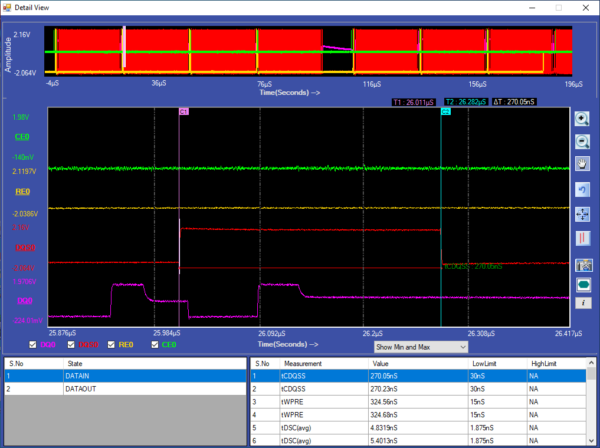
Prodigy Technovations supports ONFI interface protocol decode and analysis.

ONFI Electrical Timing Analysis Software

ONFI Electrical Timing Analysis Software

eSPI Protocol INTRODUCTION

eSPI stands for the enhanced serial peripheral interface. It was developed by Intel. eSPI is an all-in-one bus that was designed to replace the LPC bus as well as the SPI bus, SMBus, and sideband signals. For designers of computing applications, migrating from the LPC bus to the eSPI bus offered benefits such as cost savings, lower voltage, simplified board layout and design, and low power consumption. The eSPI bus can either be shared with SPI devices to save pins or be separate from the SPI bus.

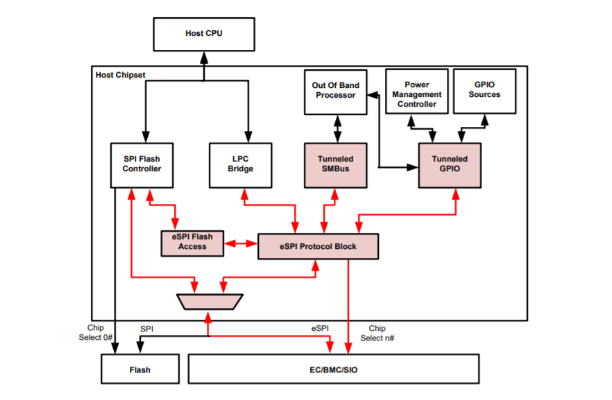
An EC/BMC/SIO connection over eSPI bus

Figure 1. An EC/BMC/SIO connection over the eSPI bus

Sideband pin communications between the chipset and these devices are converted to in-band messages through the eSPI interface as part of the effort to reduce the component pin count and provide a migration path toward the elimination of high-voltage 3.3V I/O pins.

eSPI: BENEFITS

eSPI is defined to meet the following requirements.

● Medium Bandwidth: The bus bandwidth needs to be higher than that of the Low PinCount (LPC) bus.
● LPC Replacement: Supports all the capabilities needed to replace the parallel LPC interface. However, 8237 DMA and Firmware Hub (FWH) are not supported over this interface.
● Sideband Pins as In-Band Messaging: Facilitates the removal of sideband pins for communication between chipset and slave devices by converting this communication into in-band messages sent over the eSPI bus.
● Real-Time Flash Sharing: Supports flash sharing based on partition-able memory mapping. Allows real-time operational access by chipset and slave devices.
● Chipset and Slave Devices SMBus Replacement: Supports tunneling of all SMBus communication between chipset and slave devices over the new interface as in-band messages.
● Scalable bandwidth: Allows the bandwidth to be scaled based on application needs to optimize power versus performance. This could be done through frequency scaling or
varying the number of active data pins.
● Low Voltage I/O Buffer: eSPI uses the same I/O buffer as Serial Peripheral Interface (SPI). The I/O buffer will support only a 1.8V mode of operation for the eSPI bus.

eSPI Protocol: PIN DESCRIPTIONS

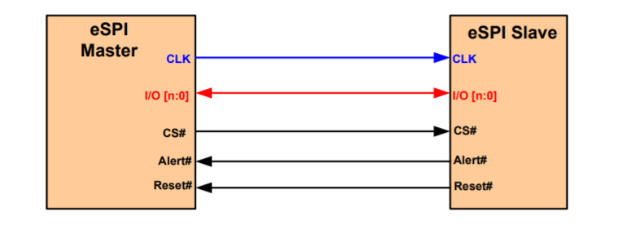
RESET

Reset is typically driven from eSPI master to eSPI slaves. In other configurations, the eSPI Reset could be generated by the eSPI master and thus, it is driven from the eSPI master to the eSPI slave.

CHIP SELECT

eSPI master and eSPI slaves must tri-state the interface pins when their respective eSPI Reset is asserted. The Chip Select and I/O[n:0] pins require weak pull-ups to be enabled on these pins.

SERIAL CLOCK

The direction of the serial clock is from master to slave. A serial clock provides the reference timing for all the serial input and output operations.

ALERT

The direction of Alert is from slave to master and it is asynchronous. Alert is used by eSPI slaves to request service from the eSPI master. The alert pin is optional for single master-single slave configuration.

I/O[n:0]

These are bi-directional input/output pins used to transfer data between masters and slaves. The value of ‘n’ may be 1 or 3 depending on the I/O mode.

In Single I/O mode (n=1), I/O[0] is the eSPI master output/eSPI slave input (MOSI) whereas I/O[1] is the eSPI master input/eSPI slave output (MISO).

Single Master-Single Slave with eSPI Reset# from Slave to Master

Figure 2. Single Master-Single Slave with eSPI Reset# from Slave to Master

eSPI Protocol: BUS TRANSACTIONS

The Serial Clock must be low at the assertion edge of the Chip Select while eSPI Reset has been de-asserted. The first data is launched from the master while the serial clock is still low and sampled on the first rising edge of the clock by the slave. Subsequent data is launched on the falling edge of the clock from the master and sampled on the rising edge of the clock by the slave. The data is launched from the slave on the falling edge of the clock. The master could implement a more flexible sampling scheme since it controls the clock. All transactions on eSPI must be in multiples of 8 bits.

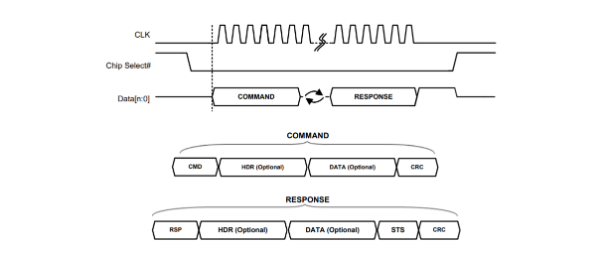
Basic eSPI Protocol

Figure 3. Basic eSPI Protocol

The eSPI transaction consists of a Command phase driven by the master, a Turn-Around (TAR) phase, and a Response phase driven by the slave. The Command phase consists of a CMD, an optional header (HDR), optional DATA, and a CRC. The Response phase consists of an RSP, an optional header (HDR), optional data, a Status, and a CRC. CRC generation is mandatory for all eSPI transactions where the CRC byte is always transmitted on the bus. However, CRC checking is default disabled after reset and it is enabled by SET CONFIGURATION. When CRC checking is disabled, the CRC byte is ignored by the receiver. A transaction could be initiated by the master through the assertion of Chip Select, Start the clock, and drive the command onto the data bus. The clock remains toggling until the complete response phase has been received from the slaves.

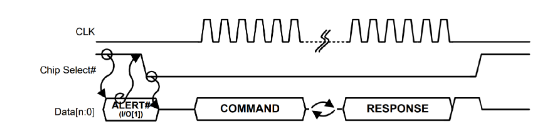
Slave Triggered Transaction (Single Slave)

Figure 4. Slave Triggered Transaction (Single Slave)

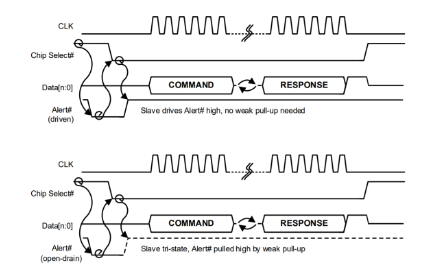
A transaction could be initiated by the slave by first signaling an Alert event to the master. The Alert event could be signaled in two ways. In the Single MasterSingle Slave configuration, the I/O[1] pin could be used by the slave to indicate an Alert event. In the Single Master-Multiple Slaves configuration, a dedicated Alert pin is required. The Alert event can only be signaled by the slave when the slave’s Chip Select is high.

Slave Triggered Transaction (Multiple Slaves)

Figure 5. Slave Triggered Transaction (Multiple Slaves)

Debug of eSPI Protocol:

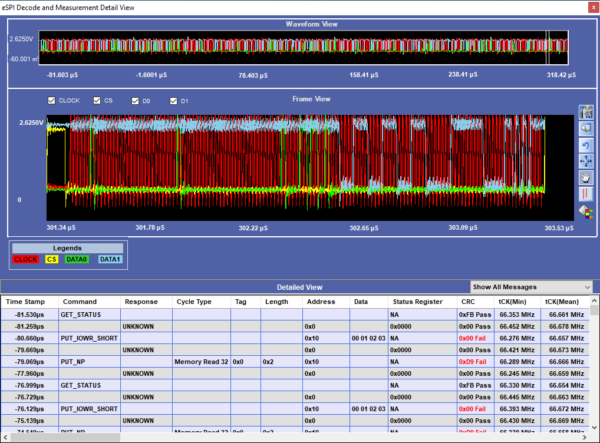
Debugging eSPI remains a challenge in engineering development. Prodigy Technovations provides state of an art tool for eSPI Protocol Debug and analysis.

eSPI Electrical Validation and Protocol Decode Software

eSPI Electrical Validation and Protocol Decode Software

About Prodigy:

Prodigy Technovations continues to lead in the protocol analysis space. Prodigy Technnovation offers protocol analysis for basic serial protocol like I2C to complex high speed protocols like PCIe. The protocol analyzers range from CAN, I2C, SPI, QSPI, I3C, PCIe, and UFS Plus many other protocols on the serial bus.

A Protocol Analyzer is a measurement tool or device used to capture and monitor data over a communication channel. It captures the data on the communication channel and converts the data bits into meaningful protocol sequences. A protocol analyzer uses a combination of software and hardware to analyze and capture the data over the communication channel. It empowers the engineer to understand the protocol and further analyze the captured protocol sequence. The protocol analyzer is very powerful in debugging the device and bus failures in the embedded system.

Type of Protocol Analyzer:

The industry has two types of protocol analyzers. Hardware protocol analyzer and software protocol analyzer.

Hardware protocol analyzer: The hardware-based protocol analyzer uses hardware and software to capture the packets. Hardware-based protocol analyzers are used to debug hardware and complex SoC protocol interfaces. The hardware-based protocol analyzer captures the packets of the interfaces for downstream analysis. Some of the common hardware-based protocol analyzers are UFS protocol analyzers, eMMC protocol analyzers, and PCIe protocol analyzers.

Software protocol analyzer: Software-based protocol analyzers use only software to capture and analyze the protocol. These are commonly known as network analyzers. The software protocol analyzer is used for capture and analysis of LAN, Wireless network, etc.

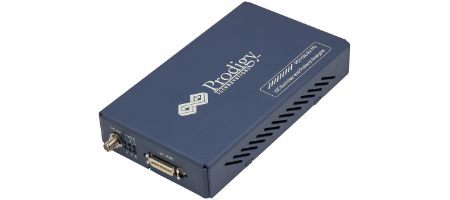
What does a hardware protocol analyzer look like?

I3C Protocol Analyzer and Exerciser

Fig 1.0 – I3C Protocol Analyzer and Exerciser

Prodigy’s Protocol analysis software – Captured Packet Image

Prodigy’s Protocol analysis software – Captured Packet Image

Advantages of using the Protocol analyzer:

Development Time: By using a protocol analyzer the engineering team can cut down the development time significantly. The engineering team can quickly capture the protocol packets and analyze the complex protocols. The debug time can be cut down from months to a few weeks.

Errors in manual Analysis: Most of the teams use manual capture and analysis of the protocol. Manual reporting and analysis may work for a small amount of data but as the complexity of capture increases the error in reporting and analysis also increases. Using a protocol analyzer inbuilt software the error in capture can be reduced to zero

Automation of Work Environment: Many protocol analyzer support API integration enabling the engineers to create fully automated test cases. The automated test cases can be run as overnight regressions. This will enable engineers to create complex test cases and validate the system thoroughly.

Protocol compliance: The protocol analyzer can quickly report any violation of protocol standards and ensure proper compliance with the protocol standard.

About Prodigy:

Prodigy Technovations works on a hardware protocol analyzer. Prodigy has developed state of the art Protocol analyzer to debug various Protocols. The protocol analyzers range from CAN, I2C, SPI, QSPI, I3C, PCIe, and UFS Plus many other protocols on the serial bus.

<PRODIGY’S PROTOCOL ANALYZERS

Introduction to PCIe Express:

This blog describes the fundamentals of the Peripheral Component Interconnect Express (PCI Express) protocol. In personal computers, peripheral devices connect to the processor subsystem using Peripheral Component Interconnect (PCI), Peripheral Component Interconnect eXtended (PCI-X), Accelerated Graphics Port (AGP), and PCIe buses. Peripherals can be graphic cards, hard disk drives, SSDs, WiFi, and ethernet devices. PCIe replaces PCI, PCI-X, and AGP bus protocols used in computing machines of earlier days. The advanced version of PCI is PCI-express(PCIe). PCIe, PCI-e refers to PCI express protocol.

Comparison of PCI and PCIe:

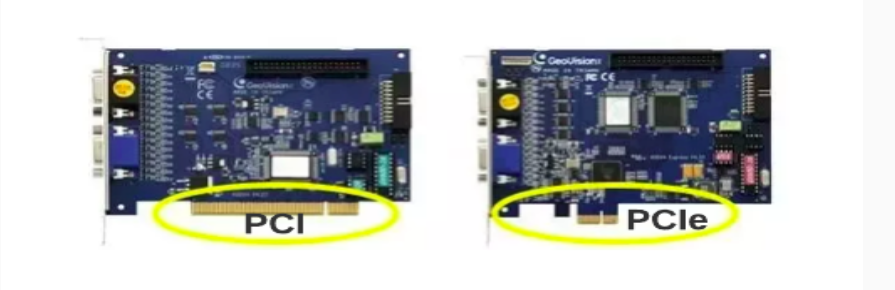
Fig. 1 shows the legacy PCI and PCIe ports. PCI is a parallel interface whereas PCIe is a serial interface. PCI uses individual buses for each of the devices connected to it instead of a shared one like what PCIe uses.

The difference in speed between a standard PCI interface and 16 slot PCIe is large. The legacy PCI has a data rate of 133MB/s but the PCIe has a data rate of 16GB/s.

Also, PCI slots are the same sizes for all devices. PCIe slots differ depending on which form factor it accepts. The longest would be the 16-lane slot and, the shortest is for the 1-lane slots.

PCI and PCIe slots on motherboards

Fig. 1 PCI and PCIe slots on motherboards

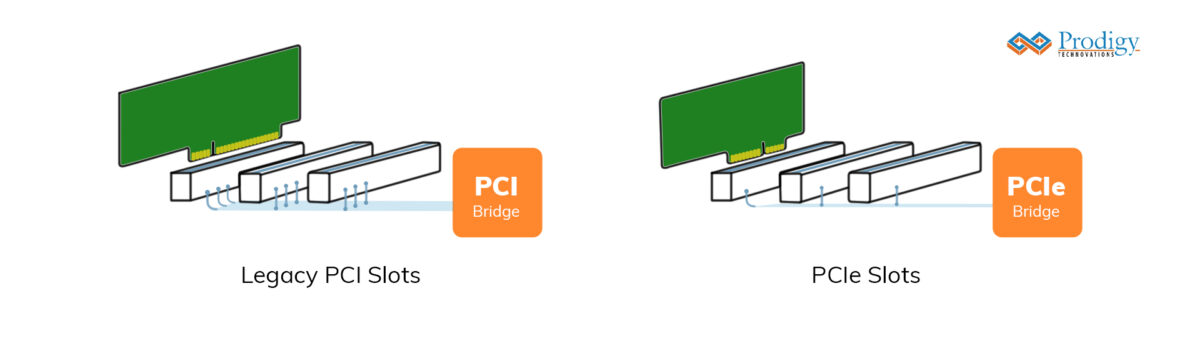
Fig. 2 shows the topology of PCI and PCIe. Legacy PCI is a parallel data transfer protocol. But PCIe is a serial data transfer protocol.

 Legacy PCI and PCIe slots topologies

Fig. 2 Legacy PCI and PCIe slots topologies

PCI Special Interest Group (PCI-SIG):

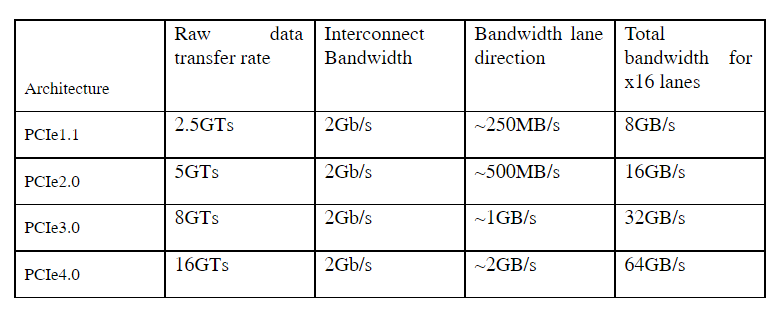
PCI-SIG defines and maintains the technical specifications and standards for PCI and PCIe. PCI-SIG is a special interest group of 900 companies. It defined PCIe in 1995 as PCIe 1.1. Since then, it has developed four versions of PCIe standards for improved architectures. PCIe supports high data throughput, and low power, and is of smaller size. PCIe makes today’s laptops, and computers smaller, making them powerful, portable, and handy. Lanes in PCI-e are many interfaces on which data transfers can happen in parallel. Laptop expansions and computer storage interfaces like SATA Express use PCI-e with many lanes. Table 1 shows the PCIe architectures and their bandwidth details:

Table 1 PCIe architectures and their bandwidth details

 Legacy PCI and PCIe slots topologies

PCIe Features:

The main features of the PCIe protocol are:

  1. Point-to-point serial transfer protocol with master-slave configuration.
  2. Scalable with lane aggregation supporting multiples of transfer rates.
  3. Uses the same memory, IO, address space, and configuration as PCI and is compatible with it.
  4. Uses packet-based transaction protocol like ethernet
  5. It has improved data integrity with error handling

PCIe Pin descriptions:

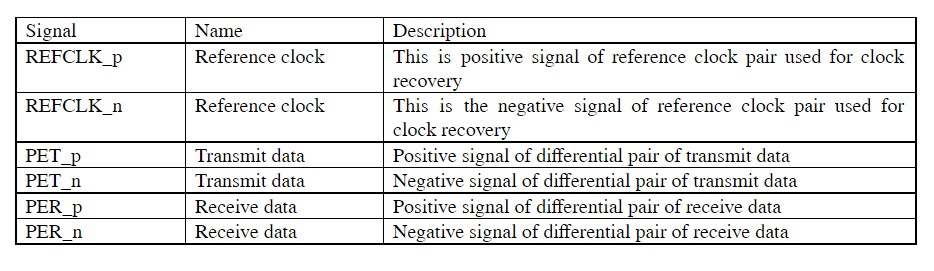
PCIe comes in two configurations: 1 lane called PCIe x1 and 16 lane PCIe x16. It is a serial bus point-to-point protocol. General processors use the smallest PCI x1 slots. Graphic cards use the longest PCI x16 slots. PCIe x1 interface has 36 pins arranged in pairs of 18 pins. Out of 36 pins, only 6 pins are functional pins and the remaining are power or auxiliary pins. The six functional pins operate as differential pairs of signals. Differential signals are more immune to external interferences. They consume low power and help in clock recovery. PCIe x1 signal description is shown in Table 2.

PCIe 1x signal description

Table 2 PCIe 1x signal description

Multi-lane PCIe uses many of these functional signals except the REFCLK differential pair. For example, a two-lane PCIe uses five signal pairs with REFCLK and two PET, and two PER pairs. PCIe x16 uses thirty-three signal pairs.

PCIe stack

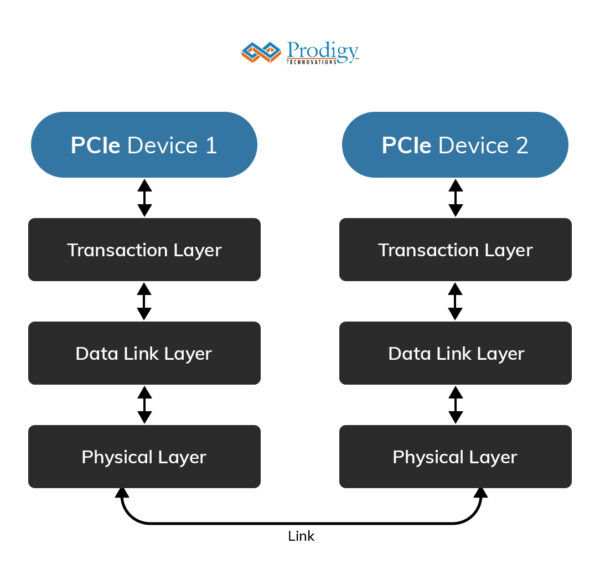
PCIe achieves reliable data transfers using a three-layer PCIe protocol stack as in Fig. 3.

 PCIe protocol stack

Fig. 3 PCIe protocol stack

The physical layer handles reliable transmission on the link with 8/10 encoding. The physical layer also does Clock recovery from the data it receives. Frequent data toggling ensures clock generation. But when the data is not toggling frequently, ten-bit data encoding toggles the data for this. A cyclic redundancy check (CRC) is used to help in correcting any data errors in the interface.

The data link layer checks received packets for packet errors with the help of retransmissions for errored packets and manage acknowledgments.

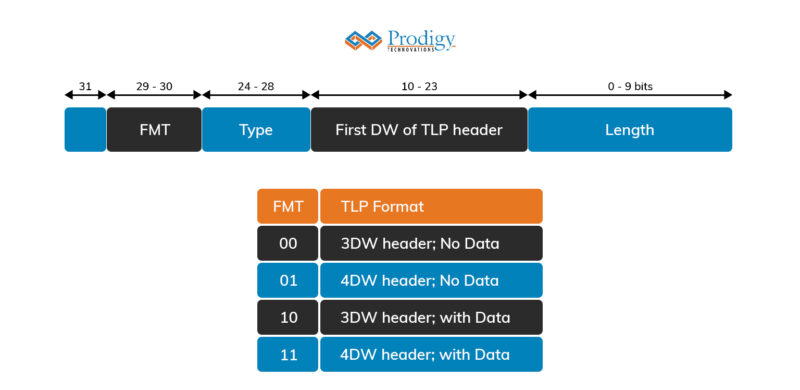
The transaction layer gets 32-bit words called double words (DWs) on the 32-bit interface from the master device which is sent as packets containing address, and data to the data link layer. Transaction layer DWs are called transaction layer packets (TLPs). TLP packet contains header and payload fields as shown in Fig. 4

TLP packet structure

Fig. 4 TLP packet structure

The detailed packet format is shown in Fig. 5

TLP Detailed packet format

Fig. 5 TLP Detailed packet format

Data transfers:

PCIe transactions are requested and completions. There are four types of requests: Depending on the destination requests are classified as follows:

  • Memory write/read
  • IO write/read
  • Configuration
  • Message

Depending on whether they require completion, they are further classified as posted or non-posted requests. The request is non-posted if they do not need completion.

Memory or IO Data write:

When the master device wants to write 32-bit data onto the peripheral device, it initiates a write transfer request on the PCIe bus. This packet consists of a header, which is either 3 or 4 DWs long (depending on if 32 or 64-bit addressing is used) and one 32-bit DW to be written. Write-to memory happens in bursts. When the write requests are non-post requiring completion, the throughput reduces to Mbps as each write request must wait for completion. IO and configuration transactions are single transactions. When the PCIe master requests to read Memory, The PCIe device reads the data and responds to the master with the read data as completion with the data message.

Terminologies associated with PCIe:

Other terminologies associated with PCIe topologies are the following:

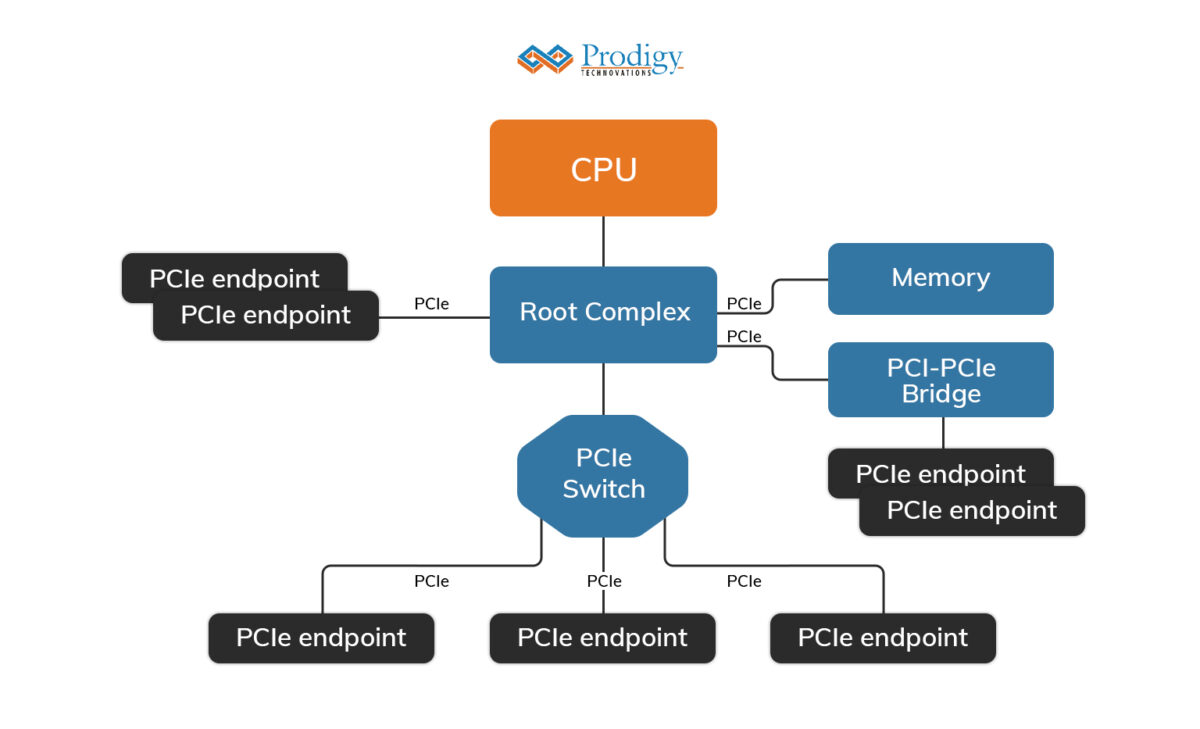
  • Root Complex
  • End Point
  • PCIe bridge
  • LTSSM

Root Complex: It is the “root” of the PCI inverted tree topology and acts on behalf of the CPU to communicate with the rest of the devices. It connects the system CPU to the PCIe topology. It initiates configuration requests as the requester. Fig. 6 shows the position of the root complex in PCIe topology.

Root complex position in PCIe topology

Fig. 6 Root complex position in PCIe topology

Endpoint: According to the PCIe specification in the PCIe topology there can be 256 buses, 32 devices on each bus, and 8 functions in each device.

An endpoint can support a maximum of up to 8 functions and every function has its own separate configuration space. A function in an endpoint can be a separate individual entity where it has its functionality. PCIe-based NVM and PCIe-based SSDs are two end-point devices on a computer system.

PCIe PCI bridge: They are adapters that allow PCI devices to connect to PCIe slots in systems by doing protocol conversions from PCI specification to PCIe 1x specification. The master sends requests with the necessary parameters to the PCIe bridge. PCIe bridge converts requests into point-to-point transfers on the requested lane in the interface.

LTSSM: LTSSM is an abbreviation of link training and the status state machine which manages PCIe devices. It is the main state machine control that detects, Polls, Configures, Recovers, Resets, and Disables the devices at the right times during operation.

Debugging PCIe Protocol

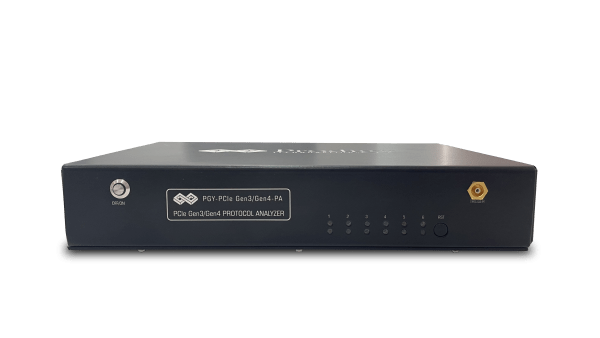
Debugging PCIe Protocol can be a complex and challenging task for engineers. Prodigy’s cutting-edge PCIe Gen3/4 Protocol Analyzer is the solution you need for debugging high-speed protocols like PCIe.

With support for PCIe Gen3 and Gen4 specifications, our protocol analyzer provides advanced features to capture and analyze PCIe protocol data. It helps you identify and troubleshoot issues, ensuring optimal performance and reliability of your PCIe-based systems. Don’t let PCIe protocol debugging slow you down – empower yourself with Prodigy’s PCIe Gen3/4 Protocol Analyzer.

PGY-PCIe Gen3/4 Protocol Analyzer

PGY-PCIe Gen3/4 Protocol Analyzer

UFS stands for Universal Flash Storage. UFS is an advanced, high speed, low power, high-performance non-volatile interface designed for mobile systems such as smartphones and tablets UFS is an open standard and defined by JEDEC and incorporates standards from the MIPI alliance. UFS utilizes the SCSI architecture model supporting multiple commands, including command queuing enabling multi-threaded programming. UFS is the most advanced specification for both embedded and removable flash memory-based storage in mobile devices. The maximum I/O data rate for UFS is 1.45Gbps scalable up to 5.8Gbps.

Benefits OF UFS Protocol

1. Low energy consumption.
2. Low voltage differential signaling (LVDS) Interface.
3. Fast performance with a high-speed serial interface.
4. Reliable advanced physical, link, and command protocol layers.

UFS Protocol: Theory of Operation

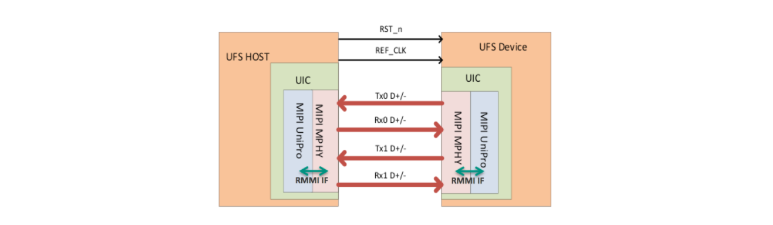
UFS Interface:

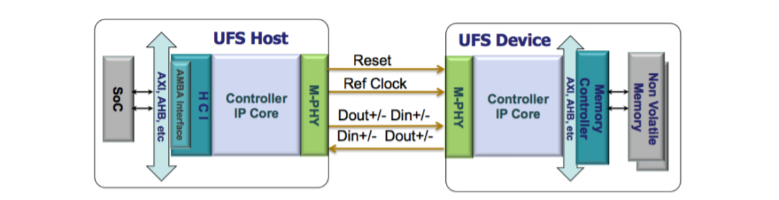
UFS follows the Host and Device Model. The UFS Host initiates the transaction to the UFS Device. The data is transferred over a high-speed interface to the MPHY. The MPHY decodes high-speed serial data and passes it to the upper layer for further processing.

UFS Interface

Figure 1. UFS Interface

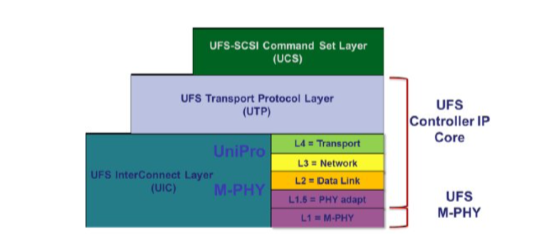
UFS Protocol Architecture:

There are three major layers in the UFS architecture:

1.UCS
2 UTP
3.UIC (UniPro+ M-PHY).

UFS Layered Architecture

Figure 2. UFS Layered Architecture

UFS Command Set layer (UCS):

The command set layer (UCS) is the interface to the software application and incorporates the SCSI standard as the baseline protocol for UFS specification.

UFS Transport layer(UTP):

The transport layer (UTP) is responsible for encapsulating the protocol into the appropriate frame structure for the interconnect layer.

UFS Interconnect layer:

The interconnect layer (UIC) is the lowest layer of UFS architecture. It handles the connection between the UFS host and the UFS device. UIC consists of MIPI UniPro and M-PHY.

UniPro

UniPro stands for Universal Protocol defined by MIPI. UniPro has four layers, Layer 1 is the physical layer, layer 2 the data link layer, layer 3 the network layer and layer 4 the transport layer. Layer 1 and 2 ensure the data integrity and reliability, layer 3 and 4 ensure that the data is routed to the intended UFS host or device.

M-PHY I/O

MIPI defines two types of M-PHY, type 1 and type 2.

Type 1 uses NRZ signaling for High speed (HS) and Pulse width modulation (PWM) signaling for Low Speed (LS)

Type 2 uses NRZ signaling for both High speed (HS) and Low speed (LS).

UFS utilizes two-speed modes, a high-speed mode, and a low-speed mode. M-PHY also supports multiple power states such as Stall (HS), Sleep (LS), Hibern8

Protocol layers of UFS Architecture

Communications Architecture Layer

Figure 3. UFS Communication Architecture Layers

Application Layer

The application layer has three primary components: UCS layer, Task manager, and device manager. The UFS interface is designed to be protocol-agnostic. UFS supports a subset of SCSI commands. UCS handles SCSI commands supported by the UFS specification, the Task manager handles task management functions defined by the UFS that are meant for command queue control and the device manager handles device level operations and device configuration operations. Device-level operations constitute the device power management operations and commands to interconnect layers. Device-level configurations constitute the handling of query requests that are used to modify and retrieve configuration information of the device.

UTP LAYER

The UTP layer is responsible for providing services to the higher layers via service access points (SAPs). UTP defines three SAPs for higher layers:

UDM_SAP: The device manager SAP is to provide services for device-level operations. These device-level operations are done through query requests.

UTP_CMD_SAP: The command SAP is responsible for providing services to the UCS layer to transport commands.

UTP_TM_SAP: The task management SAP is responsible for providing services to the task manager to transport task management functions. UTP transports messages via the UFS protocol information unit.

UIC LAYER

UIC is the lowest layer of UFS architecture. It handles the connection between the UFS host and the UFS device. UIC consists of MIPI UniPro and M-PHY. UFS uses UniPro as its link layer and M-PHY as its physical layer.

UFS Host and Device

Figure 4. UFS Host and Device

UFS is agnostic and offloads the link establishment, link reliability, and speed control between host and device. In UFS 3.0 MIPI M-PHY v4.1 and UniPro v1.8 form the UFS interconnect layer (UIC) that connects a UFS host to a UFS storage device. These two layers communicate over an RMMI Interface and can support two transmit and two receive lanes thereby giving a full duplex interface with the ability to simultaneously read and write data.

Debugging of UFS Protocol:

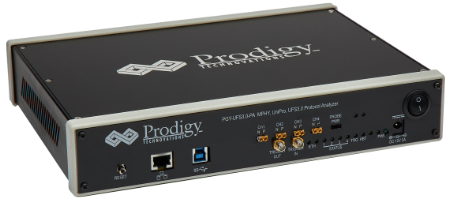
Debugging of UFS Protocol can be complex and challenging. Engineers need to not only understand the PHY-related challenges but also higher-level protocol data needs to be analyzed. Prodigy offers state of art UFS 4.0 protocol analyzer that can be used to debug complex high-speed protocols like UFS. The protocol analyzer supports UFS 3.0 and UFS 4.0 Protocol specifications.

UFS3.0-Protocol-Analzyer

UFS Protocol analyzerhttps://www.prodigytechno.com/device/ufs-4-0-protocol-analyzer/

Request For Quote

Share your requirement and our team will provide a tailored quote based on your validation needs.

"*" indicates required fields

This field is for validation purposes and should be left unchanged.
Address*

Request For Demo

Tell us your use case and our team will schedule a product demo aligned to your validation workflow.

"*" indicates required fields

This field is for validation purposes and should be left unchanged.
Address*

Request A Demo

Tell us your use case and our team will schedule a product demo aligned to your validation workflow.

"*" indicates required fields

This field is for validation purposes and should be left unchanged.
This field is hidden when viewing the form
Address*

Request Quote

Share your requirement and our team will provide a tailored quote based on your validation needs.

"*" indicates required fields

This field is for validation purposes and should be left unchanged.
Address*